SLA is an agreement on how fast the team reacts to a task and how fast it resolves it. Each priority has two norms: reaction and resolution. HubNext calculates whether a task is on time and shows it in the task, on the Kanban board and on the dashboard.
Where to find it
Management → SLA. Head and above can configure it.
How to set it up
- Set the working hours: the start and end of the day and the working days. By default 10:00–17:00, Mon–Fri, in server time. SLA clocks run only during working hours: a task created on Friday evening starts counting on Monday at 10:00.
- In Norms by priority, enter the reaction and resolution for each priority (critical, high, medium, low) in hours and minutes. An empty field means no norm.
- Click Save.
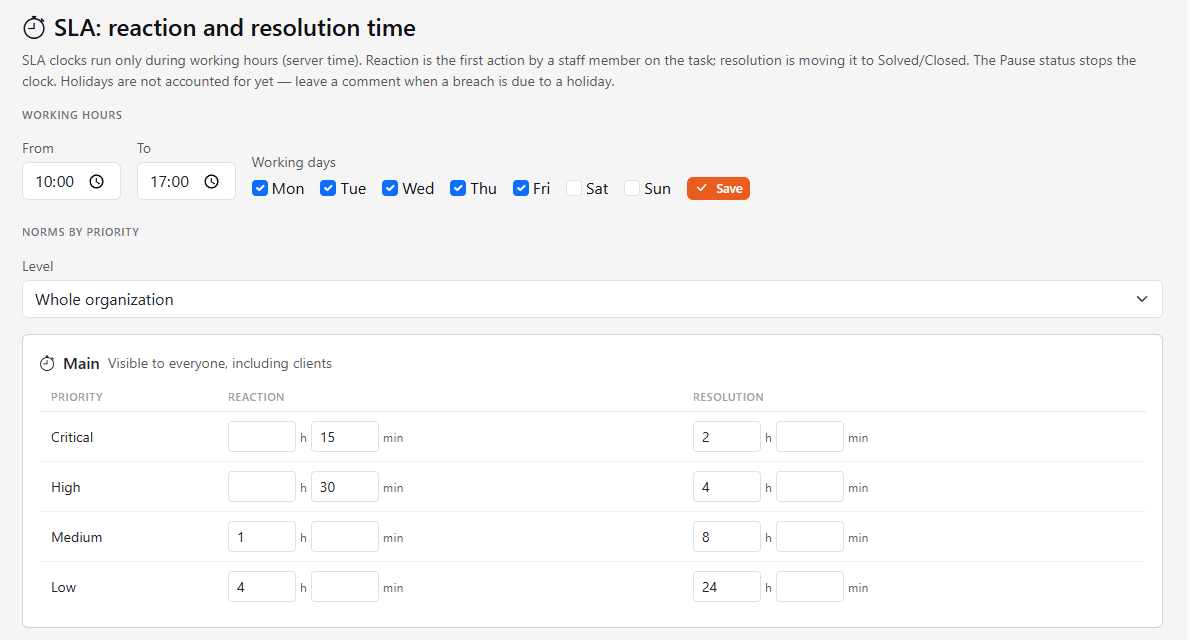
You can set norms for the whole organization, or pick a project in the Level list and override the norms for it only. A project norm overrides the organization norm; an empty field falls back to the organization (its value is shown under the field).
Three kinds of SLA
Norms are set separately for each kind — for the organization or for a project:
- Main — visible to everyone, including clients.
- Internal — visible to staff only, hidden from clients.
- System — visible to administrators only.
What counts as reaction and resolution
- Reaction is the first action by a staff member on the task: a public comment, or a change of status, assignee or priority. A client's replies don't count; any administrator counts as staff. "Client" is an employee type in the user's profile (Administration → Users), and guests of guest projects count too. Private comments don't count.
- Resolution is moving the task to Solved or Closed. Time in the Pause status isn't counted. If the task is reopened, resolution is counted again from that moment.
- Changing a task's priority counts as a reaction, and the resolution time restarts using the norm of the new priority.
Holidays aren't accounted for yet: if a deadline is missed because of a holiday, leave a comment on the task.
Where you see SLA
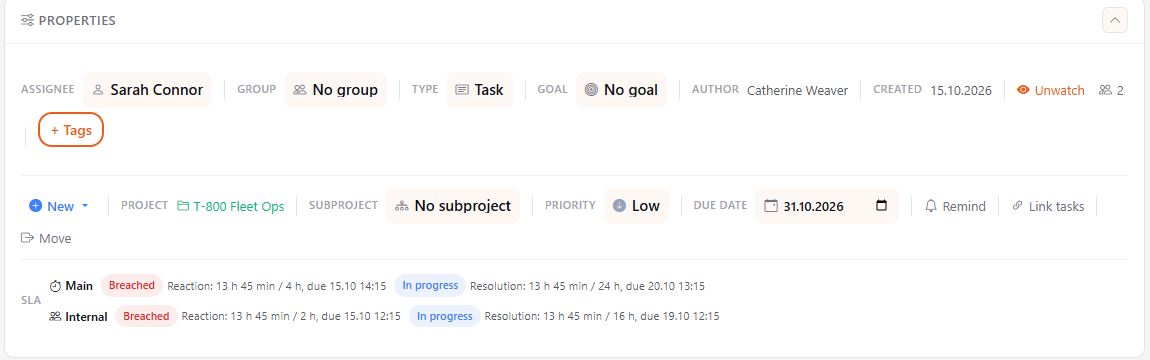
- In the task — in the properties panel, the SLA row: elapsed time, the norm and the due time. States: On time, Late, In progress, Breached, Paused.
- On the Kanban board — a stopwatch button next to the search: it calculates SLA for the cards on the board and shows a badge on each. Click again to hide the badges.
- On the dashboard — the same small button in the My tasks and Tasks from me headers.
The button appears only if your organization has an SLA that you can see; administrators always see it. By default SLA isn't calculated on the Kanban board and dashboard.
Deals and leads: the "no reaction" notification
This is a separate page: Deals → Deal SLA (visible to the heads of the organization). It sets the time of the first reaction to a new deal or lead by priority (Possible, Normal, High, Maximum): separately for deals and for leads, in hours and minutes. An empty field means there is no norm for that priority.
The same page has its own Working hours for deals and leads (start and end of the day and working days). Until they are saved, the working hours of the task SLA are used; the Use the task hours button brings them back. The task working hours are not changed.
- What counts as a reaction. Any action of an employee (not a client) after creation: a status change, a quick Action (including Take it), a badge, a priority or manager change, a comment; for a lead also conversion. Creation and automatic scenario steps do not count.
- What happens when it is overdue. If nobody reacted within the norm, the manager of the deal or lead and all heads of the organization get one notification (email, Telegram, push and the bell, as in your notification settings — the "No reaction to a new deal or lead" event). If there is no manager, the heads get it. There are no repeated notifications.
- The "Reaction" badge. While there is no reaction, the badge is shown on the deal card on the board, on the deal page and on the lead page: "Reaction: … left" or a red "Reaction overdue". After the reaction the badge disappears.
- What is checked. Only deals and leads created after you saved the norm and not older than 7 days; closed ones (won, rejected, converted) are not checked. Norms are changed by the head of the organization.