The Sales section is one board for the leads and clients you work with. Every lead and client has its own sales status that shows the stage you are at with them right now. It does not depend on the statuses of deals.
Where to find it
Sidebar → Sales. The submenu has Clients, Leads and Deals.
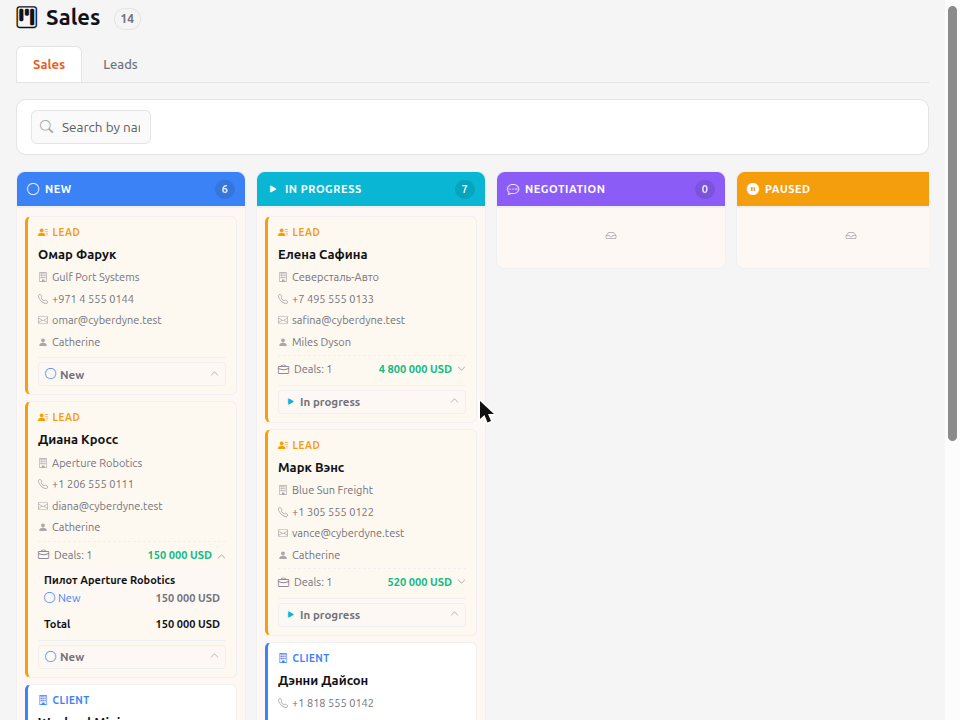
Tabs
- Sales — clients; leads are added with the Show leads switch. Available to users and above.
- Leads — leads only. Available to operators and above.
If only one tab is available, there is no switcher.
The "Show leads" switch
On the Sales tab, next to the search, there is a Show leads switch. It is off by default, and the board shows clients only. Turn it on to add leads to the clients; the column counts are recalculated. Your choice is remembered in the browser. The Leads tab is not affected by the switch: it always shows leads only.
Columns
New → In progress → Negotiation → Paused → Success → Rejected. The number in the header is how many cards the column has. New leads and clients start in New.
Columns load in batches: the Load more button at the bottom of a column shows the next cards, so even long Success and Rejected columns open quickly.
Cards
A lead and a client look different: a lead has a yellow stripe and a Lead label, a client has a blue one and a Client label. A card shows the name, phone, email and manager.
If a lead or client has open deals, a Deals: N line with the amount in each currency appears at the bottom of the card. Click it to expand the list of deals with name, status and amount, followed by the Total for each currency. The deal name opens the deal. Closed deals (Success, Rejected) are not counted.
How to change the sales status
Click the status button at the bottom of the card and choose a new one. The card moves to the right column at once, and the change appears in the Activity of the lead or client. Cards cannot be dragged.
The sales status never changes by itself: neither deals nor conversion switch it. There is one exception — when a lead becomes a client, the sales status stays the same.
Search
Type a part of a name, phone or email: the board shows only matching cards and the column numbers are recalculated. Search works with both Cyrillic and Latin letters.
What an operator sees
An operator opens the Leads tab only: they see leads and change their sales status but cannot open a lead page. There are no clients on their board.